> For the complete documentation index, see [llms.txt](https://nextsky.gitbook.io/glozin-theme/llms.txt). Markdown versions of documentation pages are available by appending `.md` to page URLs; this page is available as [Markdown](https://nextsky.gitbook.io/glozin-theme/frequently-asked-questions/change-currency.md).

# Change currency

How to change your store currency?

## Single currency <a href="#id-1.-single-currency" id="id-1.-single-currency"></a>

{% hint style="success" %}
**Step:**

1. From your Shopify admin, go to **Settings** > **Store details**.
2. In the **Store currency** section, select your new store currency from the list.
3. Click **Save**.
   {% endhint %}

<figure><img src="https://2952946279-files.gitbook.io/~/files/v0/b/gitbook-x-prod.appspot.com/o/spaces%2FJbMIFqRrJiqVKdsbTyW4%2Fuploads%2Fgit-blob-29ff8a103e2b8c124bfe90e6bfde4b83199d5ede%2Fscreencapture-admin-shopify-store-512e36-7c-settings-general-2024-06-15-10_44_41.png?alt=media" alt=""><figcaption></figcaption></figure>

## Multi-currency <a href="#id-2.-multi-currency" id="id-2.-multi-currency"></a>

{% hint style="info" %}
To sell in multiple currency, you need to install [**Geolocation app**](https://apps.shopify.com/geolocation) by shopify.
{% endhint %}

{% hint style="success" %}
**Step 1: Install the Geolocation app by Shopify**

**Step 2: Add Market**

* Go to **Settings -> Market -> Add market** to add a new Market
  {% endhint %}

{% hint style="info" %}
**Note\*:** To set the currency for new market, your must setup [Shopify Payments](https://help.shopify.com/en/manual/payments/shopify-payments) first.
{% endhint %}

<figure><img src="https://2952946279-files.gitbook.io/~/files/v0/b/gitbook-x-prod.appspot.com/o/spaces%2FJbMIFqRrJiqVKdsbTyW4%2Fuploads%2Fgit-blob-afe2d64907e197379533d8d194f611a511badd0e%2FScreenshot%202024-04-20%20164239%20(1).png?alt=media" alt=""><figcaption></figcaption></figure>

{% hint style="success" %}
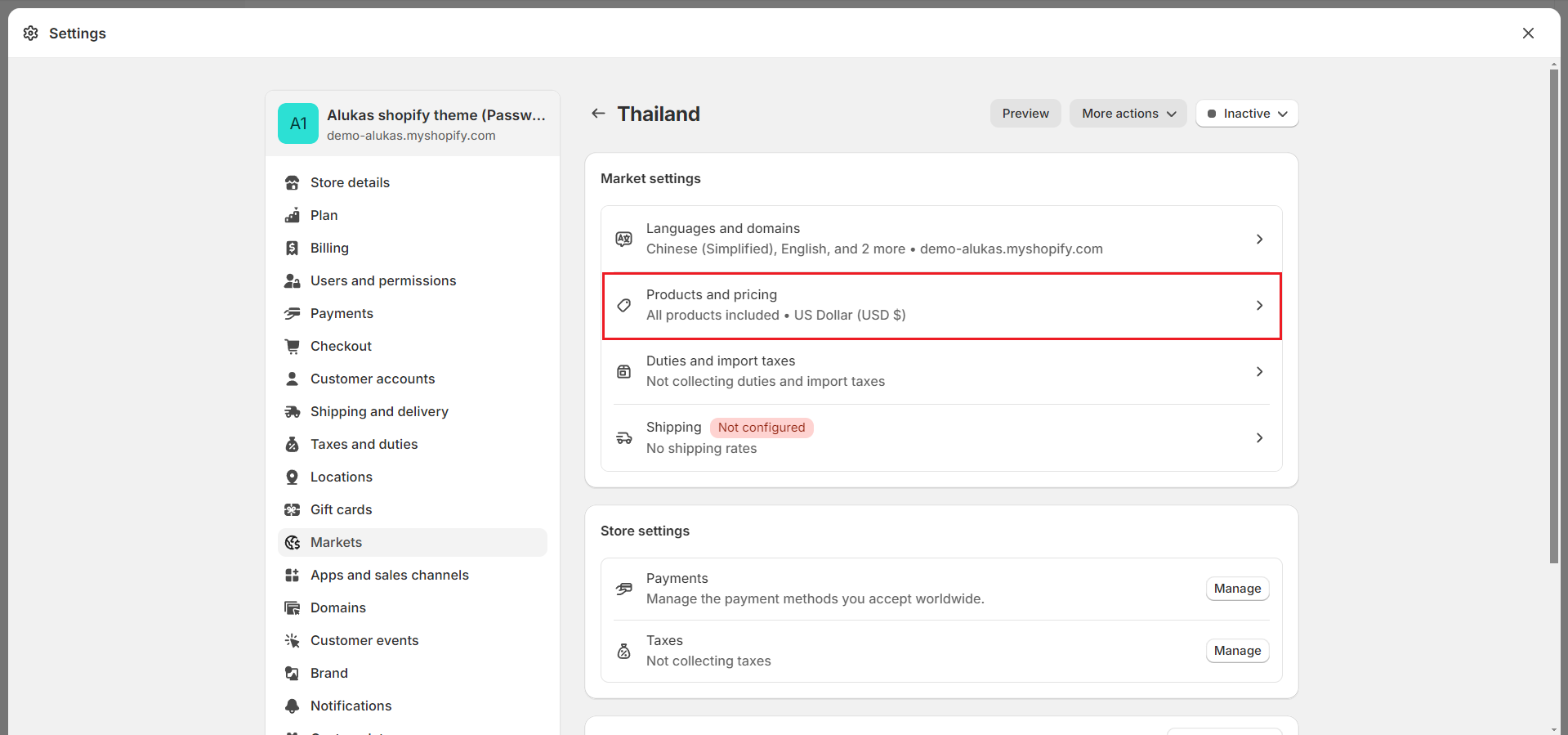
**Step 3: Setting currency to your new market**

* Go to **Settings -> Market -> Manage**
* Click to **Manage -> Products and pricing** of your new market.
* Select the currency for this market.
  {% endhint %}

<figure><img src="https://2952946279-files.gitbook.io/~/files/v0/b/gitbook-x-prod.appspot.com/o/spaces%2FJbMIFqRrJiqVKdsbTyW4%2Fuploads%2Fgit-blob-b4e2627cf9d9897c8471f9b969be80b60a203c57%2FScreenshot%202024-04-20%20164713%20(1).png?alt=media" alt=""><figcaption></figcaption></figure>

<figure><img src="https://2952946279-files.gitbook.io/~/files/v0/b/gitbook-x-prod.appspot.com/o/spaces%2FJbMIFqRrJiqVKdsbTyW4%2Fuploads%2Fgit-blob-335ee8d3ef1d1215b6615da745e24beb47e834f8%2FScreenshot%202024-06-15%20105054.png?alt=media" alt=""><figcaption></figcaption></figure>

<figure><img src="https://2952946279-files.gitbook.io/~/files/v0/b/gitbook-x-prod.appspot.com/o/spaces%2FJbMIFqRrJiqVKdsbTyW4%2Fuploads%2Fgit-blob-4d0139ff095f61fea1a6b30f373ccc0fd63cb4c7%2FScreenshot%202024-04-20%20164805%20(1).png?alt=media" alt=""><figcaption></figcaption></figure>