> For the complete documentation index, see [llms.txt](https://nextsky.gitbook.io/glozin-theme/llms.txt). Markdown versions of documentation pages are available by appending `.md` to page URLs; this page is available as [Markdown](https://nextsky.gitbook.io/glozin-theme/theme-settings/browser-tab-notifications.md).
# Browser tab notifications
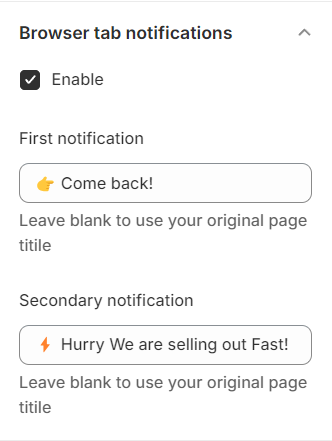
Enable notification on browser tab for web page
Browser tab notifications, which help bring back attention, will appear on the browser tab after your customers leave your website for a certain amount of time.
{% hint style="success" %}
Steps:
1. In the theme editor (**Customize**), choose **Theme settings**
2. Click **Browser tab notifications**
3. Change the notifications as you wish
4. **Save** the changes
{% endhint %}
.png?alt=media)