> For the complete documentation index, see [llms.txt](https://nextsky.gitbook.io/purity-theme/llms.txt). Markdown versions of documentation pages are available by appending `.md` to page URLs; this page is available as [Markdown](https://nextsky.gitbook.io/purity-theme/collection-and-product-page/product-page/page-template-sections/size-recommendation-1.md).

# Size recommendation

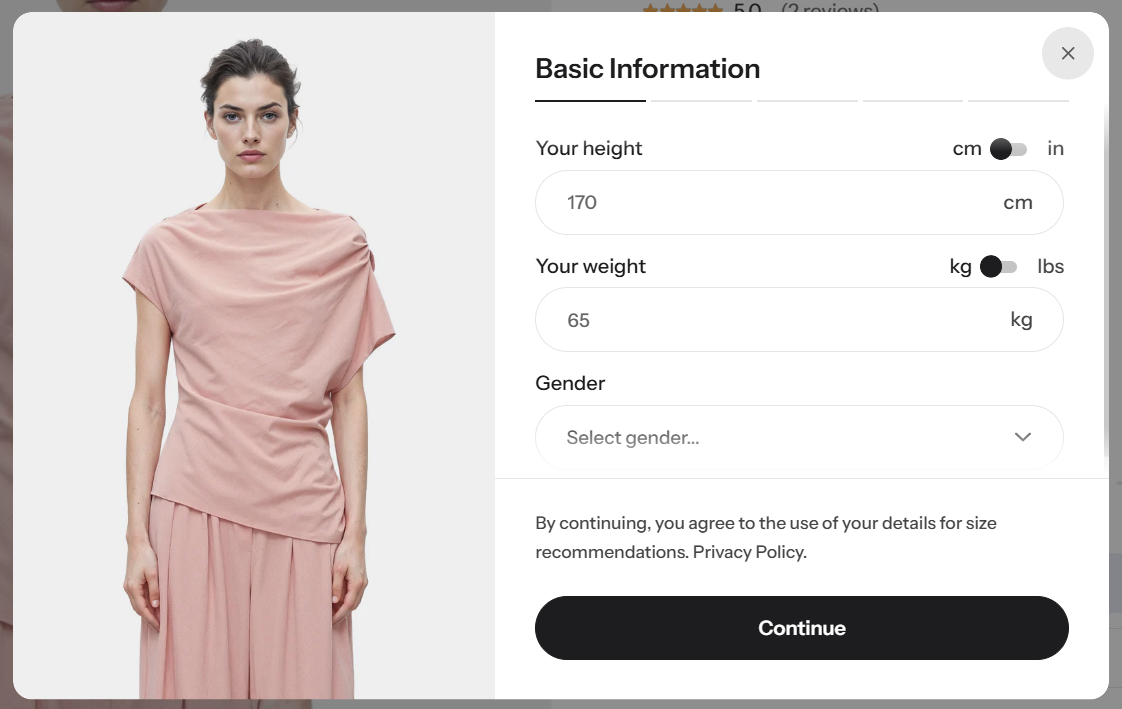
**Size Recommendation** suggests the most suitable size based on the information you enter, such as body measurements or personal details. Based on these inputs, the system calculates and recommends the best-fitting size, helping customers choose the right size more easily and conveniently.

<figure><img src="https://1059363070-files.gitbook.io/~/files/v0/b/gitbook-x-prod.appspot.com/o/spaces%2FRcDJSoM26kdEZlVFekVW%2Fuploads%2F8AQlkIzdVnTPkakcYF9o%2Fimage.png?alt=media&amp;token=17b26107-5f0a-48f1-b12f-b5f76f5716b2" alt=""><figcaption></figcaption></figure>

### General setting

<table data-full-width="false"><thead><tr><th width="143">Setting</th><th>Description</th></tr></thead><tbody><tr><td><strong>Size trigger</strong></td><td>Define the <strong>name(s) of the size option</strong> used in products. Multiple names can be added and separated by commas (e.g., Size, Größe, Misurare) so the theme can correctly <strong>detect which product option is used as the size</strong> and trigger size-related features.</td></tr></tbody></table>

#### Button settings

<table data-full-width="false"><thead><tr><th width="143">Setting</th><th>Description</th></tr></thead><tbody><tr><td><strong>Label</strong></td><td>Set the text displayed on the button.</td></tr><tr><td><strong>Button background color</strong></td><td>Choose the background color of the button to match your theme design.</td></tr></tbody></table>

#### Content in modal

<table data-full-width="false"><thead><tr><th width="143">Setting</th><th>Description</th></tr></thead><tbody><tr><td><strong>Data usage notice</strong></td><td>Inform customers how their personal details are used for size recommendations. You can customize this message to match your store’s privacy tone and policy.</td></tr><tr><td><strong>Fit recommendation note</strong></td><td>Add an explanation shown after the size recommendation results to help customers understand how the recommendation was generated.</td></tr><tr><td><strong>No size match message</strong></td><td>Set the message displayed when no size recommendation matches the customer’s inputs.</td></tr></tbody></table>
