> For the complete documentation index, see [llms.txt](https://nextsky.gitbook.io/purity-theme/llms.txt). Markdown versions of documentation pages are available by appending `.md` to page URLs; this page is available as [Markdown](https://nextsky.gitbook.io/purity-theme/global-sections/footer-group/footer.md).

# Footer

The **Footer** on a website enhances navigation, provides contact information, builds trust, ensures accessibility, aids in SEO, reinforces branding, and addresses legal requirements, contributing to an overall positive user experience.

<figure><img src="https://1059363070-files.gitbook.io/~/files/v0/b/gitbook-x-prod.appspot.com/o/spaces%2FRcDJSoM26kdEZlVFekVW%2Fuploads%2FFpGk3edPZQMFXJRsE6I1%2Fimage.png?alt=media&amp;token=1b8ddee4-5b30-46bb-ac66-2e07e3e336b3" alt=""><figcaption></figcaption></figure>

## Section settings

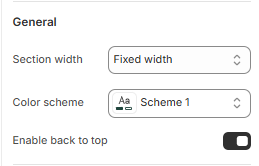
### General settings

<figure><img src="https://1059363070-files.gitbook.io/~/files/v0/b/gitbook-x-prod.appspot.com/o/spaces%2FRcDJSoM26kdEZlVFekVW%2Fuploads%2FAV68AJo91ZHpiBOoY7uc%2Fimage.png?alt=media&amp;token=725c8920-2dfc-4d15-a444-cba6d13368c6" alt=""><figcaption></figcaption></figure>

<table><thead><tr><th width="215">Setting</th><th>Description</th></tr></thead><tbody><tr><td><strong>Section width</strong></td><td><p>3 options for container</p><ul><li><strong>Stretch width</strong>: span the section width regardless of screen size.</li><li><strong>Fixed width</strong>: depends on your page content width in <strong>Theme settings</strong> <strong>-></strong> <strong>Layout</strong>.</li><li><strong>Full width</strong>: takes up the entire space on the page and it usually resizes itself to fit the size of the screen.</li></ul></td></tr><tr><td><strong>Color scheme</strong></td><td>Select colors from <strong>Theme settings -> Colors</strong></td></tr><tr><td><strong>Enable back to top</strong></td><td>Display button back to top</td></tr></tbody></table>

### Country/language selector

<figure><img src="https://1059363070-files.gitbook.io/~/files/v0/b/gitbook-x-prod.appspot.com/o/spaces%2FRcDJSoM26kdEZlVFekVW%2Fuploads%2FyNJby7LzpH7vfkRzQn8v%2Fimage.png?alt=media&amp;token=eef79019-c4bd-4102-ba47-beb5962a0929" alt=""><figcaption></figcaption></figure>

To add a country/region, go to your [market settings.](https://admin.shopify.com/store/gorde-theme/settings/markets). To add a language, go to your [language settings.](https://admin.shopify.com/store/gorde-theme/settings/languages)

<table><thead><tr><th width="215">Setting</th><th>Description</th></tr></thead><tbody><tr><td><strong>Enable country/region selector</strong></td><td>Display country/region selector</td></tr><tr><td><strong>Enable language selector</strong></td><td>Display language selector</td></tr></tbody></table>

### Follow on Shop

<figure><img src="https://1059363070-files.gitbook.io/~/files/v0/b/gitbook-x-prod.appspot.com/o/spaces%2FRcDJSoM26kdEZlVFekVW%2Fuploads%2FfljXovOf580WSb1YyMAF%2Fimage.png?alt=media&amp;token=6fc67077-2bd9-4345-98b3-60b272aea376" alt=""><figcaption></figcaption></figure>

To allow customers to follow your store on the Shop app from your storefront, Shop Pay must be enabled. [Learn more](https://help.shopify.com/manual/online-store/themes/customizing-themes/follow-on-shop)

<table><thead><tr><th width="215">Setting</th><th>Description</th></tr></thead><tbody><tr><td><strong>Enable Follow on Shop</strong></td><td>Display button follow on shop</td></tr></tbody></table>

### Payment methods

<figure><img src="https://1059363070-files.gitbook.io/~/files/v0/b/gitbook-x-prod.appspot.com/o/spaces%2FRcDJSoM26kdEZlVFekVW%2Fuploads%2Ff8dCACWbzE9FNvRgALAo%2Fimage.png?alt=media&amp;token=8750dd17-ac9c-4de1-b6a1-c9daa24160d1" alt=""><figcaption></figcaption></figure>

<table><thead><tr><th width="202">Setting</th><th>Description</th></tr></thead><tbody><tr><td><strong>Show payment icons</strong></td><td>Display payment icons</td></tr></tbody></table>

### Footer Bottom

<figure><img src="https://1059363070-files.gitbook.io/~/files/v0/b/gitbook-x-prod.appspot.com/o/spaces%2FRcDJSoM26kdEZlVFekVW%2Fuploads%2FM5m86M8yqMf4uA5zCJOI%2Fimage.png?alt=media&amp;token=131bd96b-712d-481b-bfc9-189f248ec93b" alt=""><figcaption></figcaption></figure>

<table><thead><tr><th width="202">Setting</th><th>Description</th></tr></thead><tbody><tr><td><strong>Menu</strong></td><td>Selects which menu will be displayed at the very bottom of the website.</td></tr><tr><td><strong>Policy links</strong></td><td>A toggle switch to enable or disable the display of policy links (such as Privacy Policy, Terms of Service, etc.).</td></tr></tbody></table>

### Section padding

<figure><img src="https://1059363070-files.gitbook.io/~/files/v0/b/gitbook-x-prod.appspot.com/o/spaces%2FRcDJSoM26kdEZlVFekVW%2Fuploads%2FV2TnlP4vIpSYyLVk1EB9%2Fimage.png?alt=media&amp;token=0c06ebb5-b422-4fe3-be40-637efc4eacfa" alt=""><figcaption></figcaption></figure>

<table><thead><tr><th width="202">Setting</th><th>Description</th></tr></thead><tbody><tr><td><strong>Top</strong></td><td>Customize the top margin of the section.</td></tr><tr><td><strong>Bottom</strong></td><td>Customize the bottom margin of the section.</td></tr></tbody></table>

## Block settings

### General settings

<figure><img src="https://1059363070-files.gitbook.io/~/files/v0/b/gitbook-x-prod.appspot.com/o/spaces%2FRcDJSoM26kdEZlVFekVW%2Fuploads%2FCss5yInZ3wjsB7Snk8YT%2Fimage.png?alt=media&amp;token=0ecd7004-de6d-4fb4-b30b-37f9cf0f4d92" alt=""><figcaption></figcaption></figure>

<table><thead><tr><th width="208">Setting</th><th>Description</th></tr></thead><tbody><tr><td><strong>Width</strong></td><td><p>Adjust the width between the block</p><ul><li>16%</li><li>20%</li><li>25%</li><li>33%</li><li>50%</li><li>66%</li><li>75%</li><li>86%</li></ul></td></tr></tbody></table>

### Contact bar

<figure><img src="https://1059363070-files.gitbook.io/~/files/v0/b/gitbook-x-prod.appspot.com/o/spaces%2FRcDJSoM26kdEZlVFekVW%2Fuploads%2Fwh3m84GS7hqb353vkeBL%2Fimage.png?alt=media&amp;token=5e247846-947f-43bc-9be2-81c2d0c5cb9e" alt=""><figcaption></figcaption></figure>

<table><thead><tr><th width="208">Setting</th><th>Description</th></tr></thead><tbody><tr><td><strong>Heading</strong></td><td>Title of the block.</td></tr><tr><td><strong>Address</strong></td><td>Enter your store address.</td></tr><tr><td><strong>Phone</strong></td><td>Add a phone number.</td></tr><tr><td><strong>Email</strong></td><td>Provide an email address.</td></tr><tr><td><strong>Show social media icons</strong></td><td><p>Toggle to show or hide social media icons.</p><p><em>*Note: To display your social media accounts, link them in your theme settings.</em></p></td></tr><tr><td><strong>Description</strong></td><td>Add a short description of your store.</td></tr></tbody></table>

### Menu

<figure><img src="https://1059363070-files.gitbook.io/~/files/v0/b/gitbook-x-prod.appspot.com/o/spaces%2FRcDJSoM26kdEZlVFekVW%2Fuploads%2FQ0mq6I10LAiPliJwfFVS%2Fimage.png?alt=media&amp;token=dd16dcce-fbf7-4907-bf3f-df17a39084c0" alt=""><figcaption></figcaption></figure>

<table><thead><tr><th width="208">Setting</th><th>Description</th></tr></thead><tbody><tr><td><strong>Heading</strong></td><td>Heading content.</td></tr><tr><td><strong>Menu</strong></td><td>Select the menu you want to display.</td></tr></tbody></table>

### Newsletter

Subscribers added automatically to your “accepted marketing” customer list. [Learn more](https://help.shopify.com/manual/customers/manage-customers)

<figure><img src="https://1059363070-files.gitbook.io/~/files/v0/b/gitbook-x-prod.appspot.com/o/spaces%2FRcDJSoM26kdEZlVFekVW%2Fuploads%2FZtwNTYJhUGzaEAGVJKGo%2Fimage.png?alt=media&amp;token=15d7f954-072c-48d3-a8b2-886cb09d1d13" alt=""><figcaption></figcaption></figure>

<table><thead><tr><th width="208">Setting</th><th>Description</th></tr></thead><tbody><tr><td><strong>Heading</strong></td><td>Heading content.</td></tr><tr><td><strong>Description</strong></td><td>Description content.</td></tr><tr><td><strong>Email placeholder</strong></td><td>Text brief hint inside email field.</td></tr><tr><td><strong>Button label</strong></td><td>Custom name button, if left empty, the button will be hidden</td></tr><tr><td><strong>Note</strong></td><td>Add a legal or informative note below the form.</td></tr></tbody></table>
