> For the complete documentation index, see [llms.txt](https://nextsky.gitbook.io/purity-theme/llms.txt). Markdown versions of documentation pages are available by appending `.md` to page URLs; this page is available as [Markdown](https://nextsky.gitbook.io/purity-theme/global-sections/overlay-group/quickview.md).

# Quickview

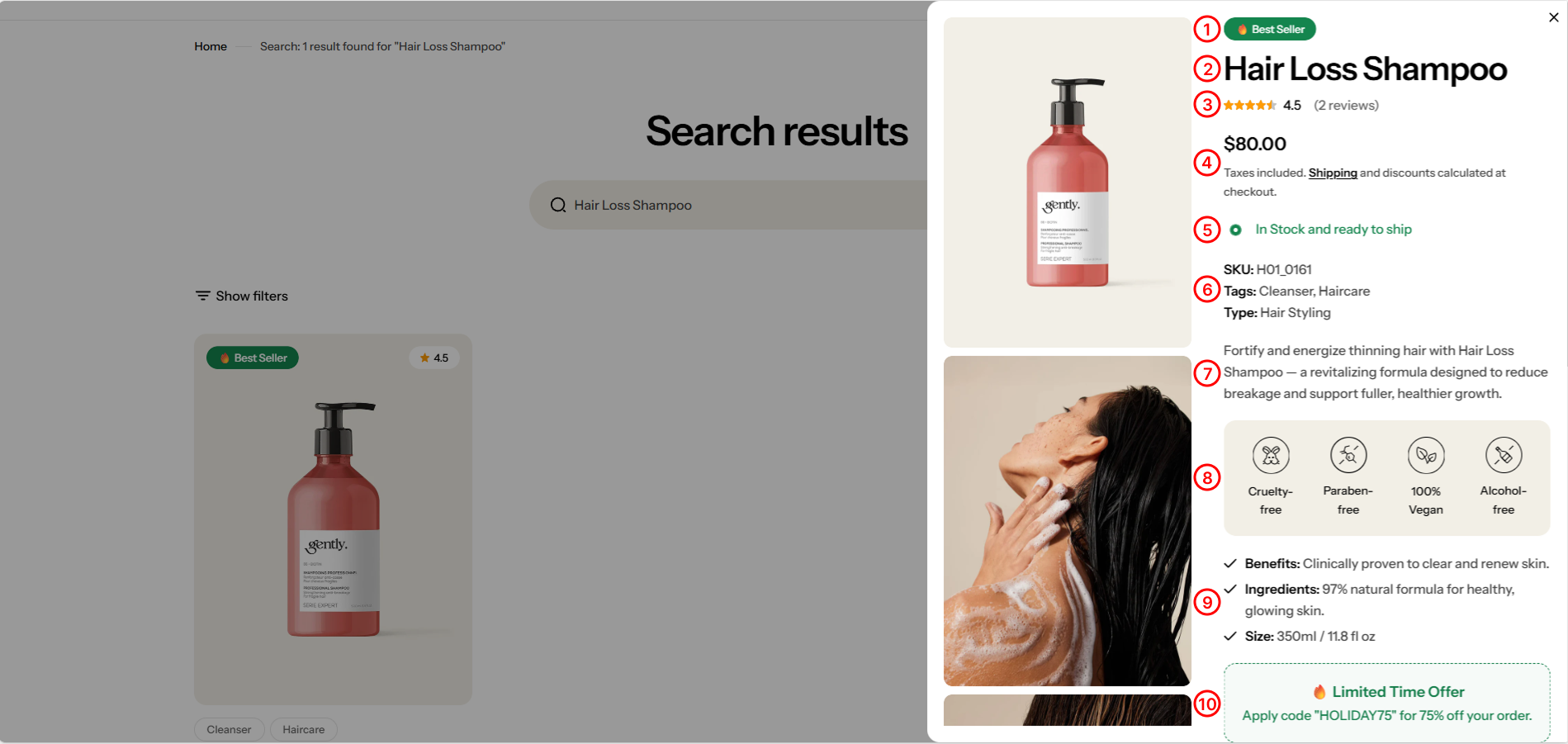
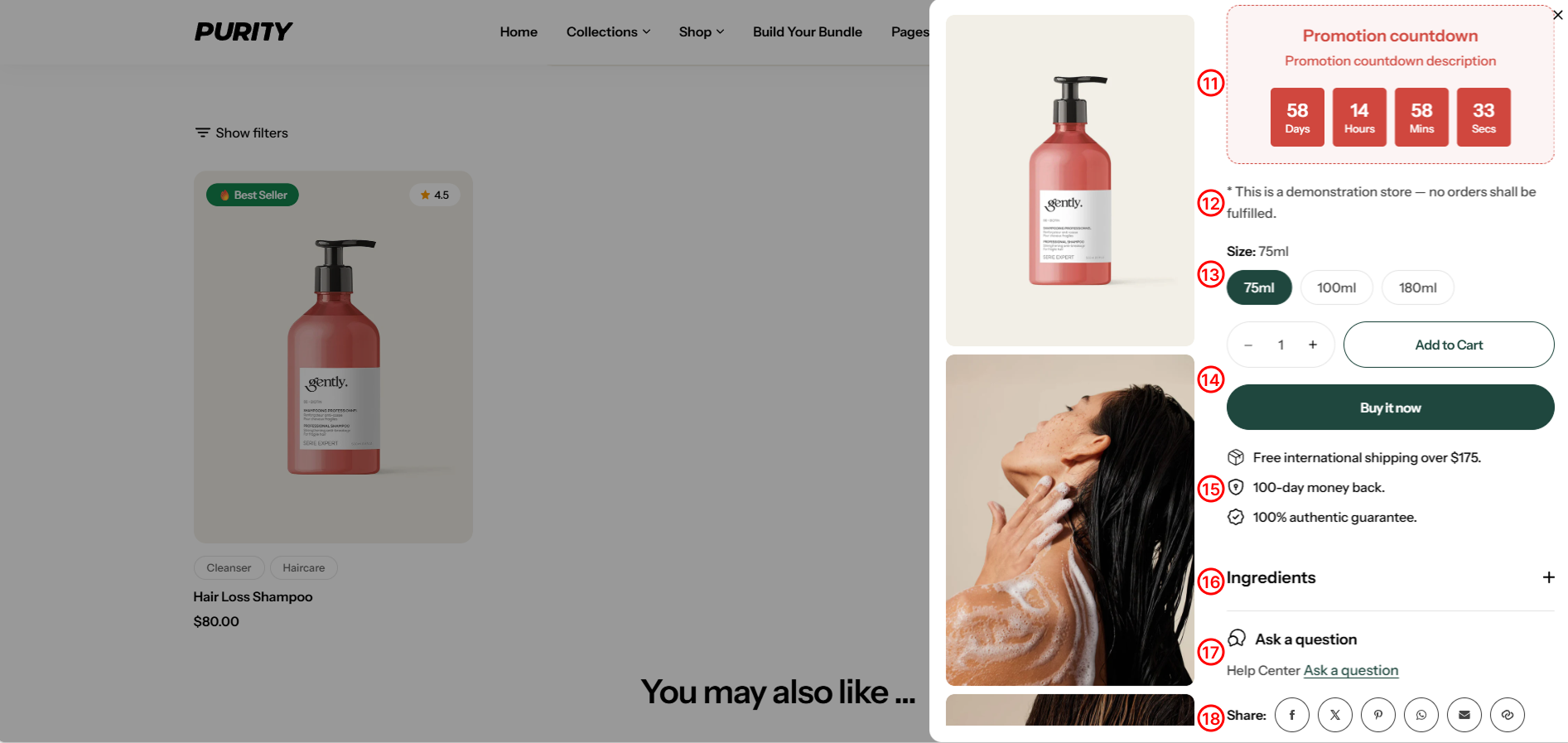
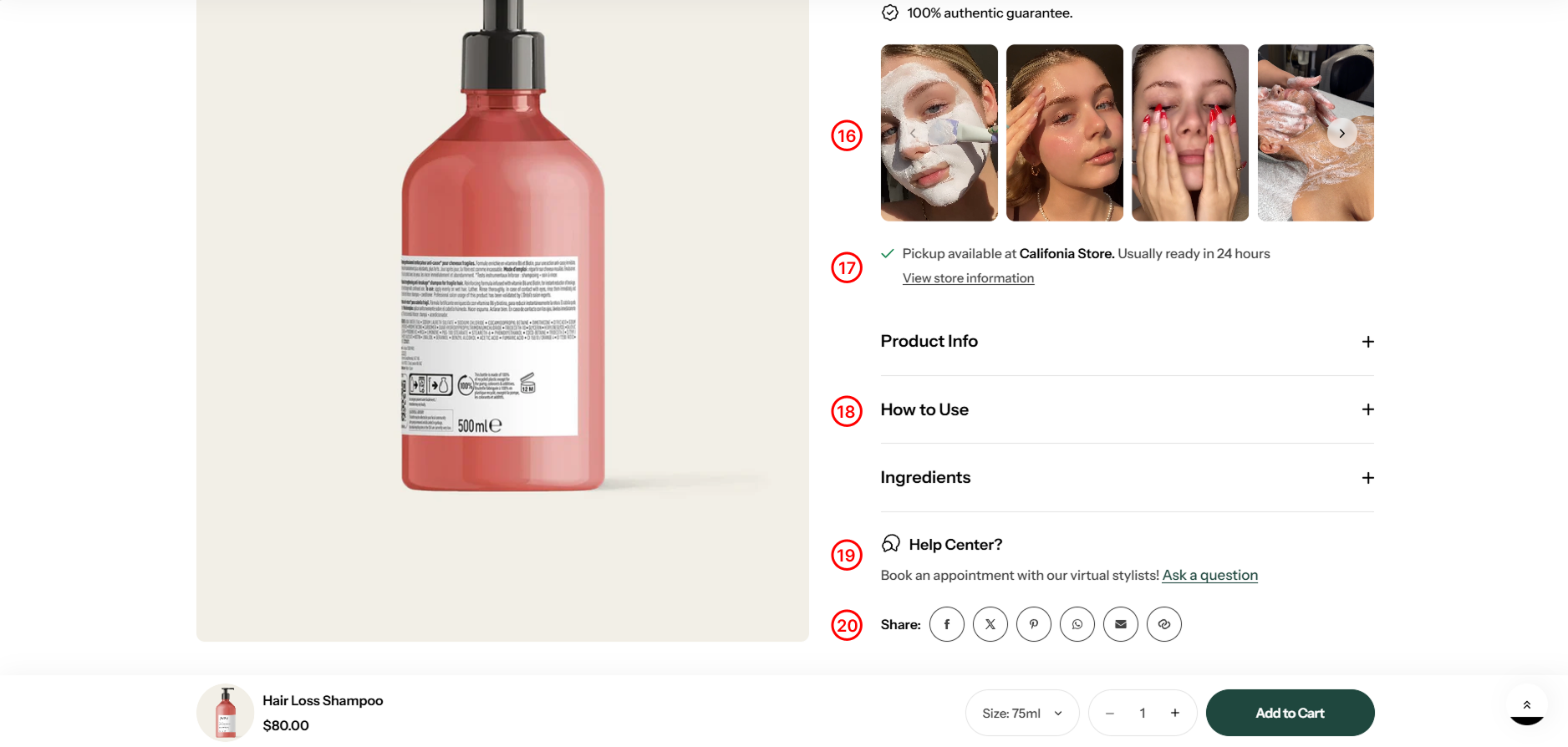
**Quickview** is a special feature developed for the products that have multiple variants. A powerful popup with a plenty of useful components:

<figure><img src="https://1059363070-files.gitbook.io/~/files/v0/b/gitbook-x-prod.appspot.com/o/spaces%2FRcDJSoM26kdEZlVFekVW%2Fuploads%2FLMZr7dtaPkCQQiwNvcOK%2FGroup%2029.png?alt=media&amp;token=c5fc466f-aabd-4196-9817-b913cad58c17" alt=""><figcaption></figcaption></figure>

#### **1. Badge**

Displays product tags.

#### **2. Product Title**

Display product title.

#### **3. Product rating**

Display the product's rating.

#### **4. Price**

Display product price.

#### **5. Inventory status**

**Inventory status** signifies the availability of a product. It's vital for ensuring products are in stock, managing inventory efficiently, and informing customers about availability on your website.

<figure><img src="https://1059363070-files.gitbook.io/~/files/v0/b/gitbook-x-prod.appspot.com/o/spaces%2FRcDJSoM26kdEZlVFekVW%2Fuploads%2FO0hcedM2SxqBNBSY8GS3%2Fimage.png?alt=media&amp;token=f87f4abe-ef42-49f9-8bd2-35a581591937" alt=""><figcaption></figcaption></figure>

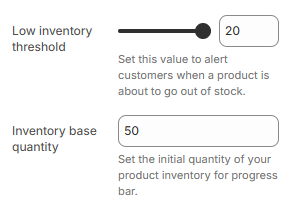
* **Low inventory threshold:** Set the number of items left to trigger a “Low stock” alert.
* **Inventory base quantity:** Set the starting stock quantity to display the progress bar correctly.

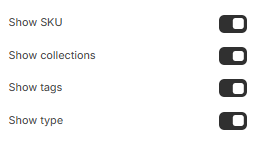
#### **6. Product meta**

Show/hide collections, SKU, product type, and product tags.

<figure><img src="https://1059363070-files.gitbook.io/~/files/v0/b/gitbook-x-prod.appspot.com/o/spaces%2FRcDJSoM26kdEZlVFekVW%2Fuploads%2FHlDDa8CBceJ6vMyZ8VY3%2Fimage.png?alt=media&amp;token=2568a7dd-950f-49d6-baca-91cf4941cd1a" alt=""><figcaption></figcaption></figure>

#### **7. Description**

Detailed product short description.

#### **8. Highlights**

Show key product benefits using icons and short labels.

#### **9. Key features**

List the key benefits of the product.

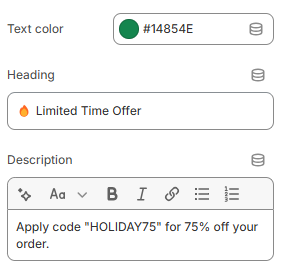
#### **10. Promotion alert**

Displays promotional messages (e.g., 🔥 Limited Time). Fill in the settings:

<figure><img src="https://1059363070-files.gitbook.io/~/files/v0/b/gitbook-x-prod.appspot.com/o/spaces%2FRcDJSoM26kdEZlVFekVW%2Fuploads%2Flb1C4XdErAtu7tzNsARE%2Fimage.png?alt=media&amp;token=8cc19d6e-5382-439a-8b6e-eadabd59ce72" alt=""><figcaption></figcaption></figure>

<figure><img src="https://1059363070-files.gitbook.io/~/files/v0/b/gitbook-x-prod.appspot.com/o/spaces%2FRcDJSoM26kdEZlVFekVW%2Fuploads%2Fg2fCrBcZve7d65MPot7i%2FGroup%2028.png?alt=media&amp;token=fdd5164b-d585-499a-a972-4fbdf4acb1c5" alt=""><figcaption></figcaption></figure>

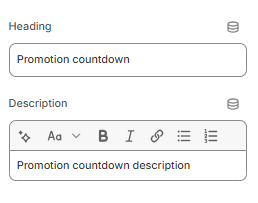
#### **11. Promotion countdown**

Display the promotion countdown.

You need to create a metafield before displaying this block. Please see how to create a metafield [here](/purity-theme/theme-installation/create-required-metafields.md).

<figure><img src="https://1059363070-files.gitbook.io/~/files/v0/b/gitbook-x-prod.appspot.com/o/spaces%2FRcDJSoM26kdEZlVFekVW%2Fuploads%2F23Om1bjVT6YELD74EvIq%2Fimage.png?alt=media&amp;token=e88b393c-a007-42d9-93de-8dbe9f7dd499" alt=""><figcaption></figcaption></figure>

#### **12. Text**

Add the custom content you want.

#### **13. Variant picker**

Products with variants provide customers with more choices. To learn more about variants and how to add them to your store, visit the following [link](https://help.shopify.com/en/manual/products/variants).

<figure><img src="https://1059363070-files.gitbook.io/~/files/v0/b/gitbook-x-prod.appspot.com/o/spaces%2FRcDJSoM26kdEZlVFekVW%2Fuploads%2Fnfqp5DTtscbwlM9kywrR%2Fimage.png?alt=media&amp;token=b6dddb2a-d711-4784-975e-bc01bdb1cb69" alt=""><figcaption></figcaption></figure>

<figure><img src="https://1059363070-files.gitbook.io/~/files/v0/b/gitbook-x-prod.appspot.com/o/spaces%2FRcDJSoM26kdEZlVFekVW%2Fuploads%2FqiRdIIEWgQcfAcWkETwL%2Fimage.png?alt=media&amp;token=03bd1515-ac54-4015-be21-9536344a48fd" alt=""><figcaption></figcaption></figure>

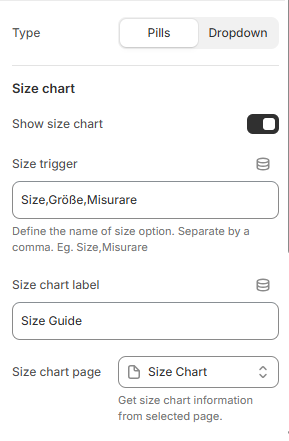
* **Type :** Pills and Dropdown
* **Show size chart:** Display size chart
* **Size trigger:** Define the label(s) used for size options. Separate multiple names with commas.
* **Size chart label:** Title of size chart.
* **Size chart page:** Select the page to display the size chart you've created.
* **Footer content:** Add custom text or links to provide additional information, such as support options or important notices, in the footer section.
* **Custom size chart:** Using specific size charts for each collection or product.To use a custom size charts for product or collection, create metafield with namespace and key: "custom.size\_chart". [Learn more.](/purity-theme/theme-installation/create-required-metafields.md)

#### **14. Buy buttons**

<figure><img src="https://1059363070-files.gitbook.io/~/files/v0/b/gitbook-x-prod.appspot.com/o/spaces%2FRcDJSoM26kdEZlVFekVW%2Fuploads%2FcFUAbalubRvINWkl2NLU%2Fimage.png?alt=media&amp;token=a9efc4e3-acf5-4985-b420-2efe5bf7868d" alt=""><figcaption></figcaption></figure>

* **Show dynamic checkout buttons:** Toggle the ''Show dynamic checkout buttons" option to include a direct checkout button
* **Show recipient information form for gift card:** Enables users to schedule gift card deliveries with personal messages. [Learn more](https://help.shopify.com/manual/online-store/themes/customizing-themes/add-gift-card-recipient-fields)

#### **15. Icon with text**

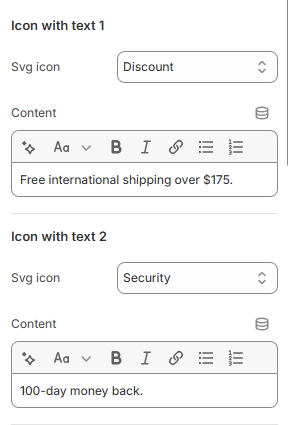
Use this block to show a small icon with a short message — like free shipping, secure checkout, or money-back guarantee.

<figure><img src="https://1059363070-files.gitbook.io/~/files/v0/b/gitbook-x-prod.appspot.com/o/spaces%2FRcDJSoM26kdEZlVFekVW%2Fuploads%2FzEax4WPhi6KBxdJl4lB7%2Fimage.png?alt=media&amp;token=4edd945b-68b0-4ed9-b9d7-be0ab942460a" alt=""><figcaption></figcaption></figure>

* **SVG Icon**: Choose an appropriate icon
* **Text**: Write a short text .

<figure><img src="https://1059363070-files.gitbook.io/~/files/v0/b/gitbook-x-prod.appspot.com/o/spaces%2FRcDJSoM26kdEZlVFekVW%2Fuploads%2FBinRm2am81giXWEJcMm3%2FGroup%2026.png?alt=media&amp;token=04ec0700-b358-4bdf-9167-57aae69cb72d" alt=""><figcaption></figcaption></figure>

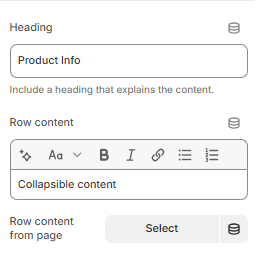
#### **16. Accordion row**

Add a heading and extra information on the tabs.

<figure><img src="https://1059363070-files.gitbook.io/~/files/v0/b/gitbook-x-prod.appspot.com/o/spaces%2FRcDJSoM26kdEZlVFekVW%2Fuploads%2FAESTxjqs5FwjjkyY4FaU%2Fimage.png?alt=media&amp;token=65c08384-f589-4b3f-99e6-8e9c0513376c" alt=""><figcaption></figcaption></figure>

* **Heading:** Include a heading that explains the content.
* **Row content:** The content, as you've written
* **Row content from page:** The content is get from the selected page

#### **17. Accordion row drawer**

This block shows content in a drawer when clicked instead of dropdown as **Accordion row**.

<figure><img src="https://1059363070-files.gitbook.io/~/files/v0/b/gitbook-x-prod.appspot.com/o/spaces%2FRcDJSoM26kdEZlVFekVW%2Fuploads%2FAESTxjqs5FwjjkyY4FaU%2Fimage.png?alt=media&amp;token=65c08384-f589-4b3f-99e6-8e9c0513376c" alt=""><figcaption></figcaption></figure>

* **Heading:** Include a heading that explains the content.
* **Row content:** The content, as you've written
* **Row content from page:** The content is get from the selected page

#### **18. Ask a question**

Display a form for users to submit questions to the seller about the product.

<figure><img src="https://1059363070-files.gitbook.io/~/files/v0/b/gitbook-x-prod.appspot.com/o/spaces%2FRcDJSoM26kdEZlVFekVW%2Fuploads%2FVeNELpdow1OWKoMLZ6lf%2Fimage.png?alt=media&amp;token=ffa3efea-d640-423e-85a2-167cf19f674b" alt=""><figcaption></figcaption></figure>

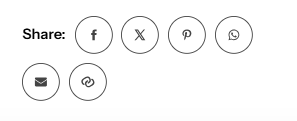
#### **19. Share**

Display social networks for sharing or copying links to share.

<figure><img src="https://1059363070-files.gitbook.io/~/files/v0/b/gitbook-x-prod.appspot.com/o/spaces%2FRcDJSoM26kdEZlVFekVW%2Fuploads%2FZMK6nMVOu966Tr9gbU1Y%2Fimage.png?alt=media&amp;token=0a9e2480-1c66-4801-97fc-7afc936994ae" alt=""><figcaption></figcaption></figure>

**Quickview** presents product details in a drawer format, offering customers a convenient way to access comprehensive information without visiting a separate product page, streamlining the shopping experience.

<figure><img src="https://1059363070-files.gitbook.io/~/files/v0/b/gitbook-x-prod.appspot.com/o/spaces%2FRcDJSoM26kdEZlVFekVW%2Fuploads%2FoYBrNm7tpnAPIbJQ1nFs%2Fimage.png?alt=media&amp;token=6e759264-b2ba-4361-aaa9-efa16c6c3514" alt=""><figcaption></figcaption></figure>

### Section setting

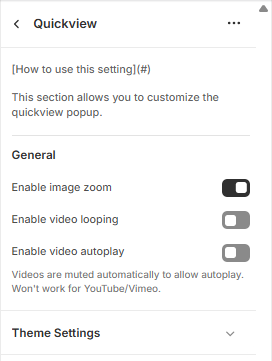
This section allows you to customize the quickview popup.

<figure><img src="https://1059363070-files.gitbook.io/~/files/v0/b/gitbook-x-prod.appspot.com/o/spaces%2FRcDJSoM26kdEZlVFekVW%2Fuploads%2Fn0GensrBIwoH3VHQllUy%2Fimage.png?alt=media&amp;token=1dae7e22-2d09-4777-a117-3737cd3ce351" alt=""><figcaption></figcaption></figure>

<table><thead><tr><th width="215">Setting</th><th>Description</th></tr></thead><tbody><tr><td><strong>Enable image zoom</strong></td><td>Let customers zoom in on product images in the quickview.</td></tr><tr><td><strong>Enable video looping</strong></td><td>Make product videos play in a loop.</td></tr><tr><td><strong>Enable video autoplay</strong></td><td><p>Automatically play product videos when the popup opens.</p><p>*<em>Note: Videos are muted automatically to allow autoplay. Won't work for YouTube/Vimeo.</em></p></td></tr></tbody></table>

### Block

In the **Quickview** settings, you can add various content blocks to customize the appearance and functionality of the Quickview feature.

* **Badge:** Displays product tags.
* **Product Title:** Display product title.
* **Product rating:** Display the product's rating.
* **Price:** Display product price.
* **Description:** Detailed product description.
* **Text:** Add the custom content you want.
* **Buy buttons:** Buttons to pay
* **Highlights:** Show key product benefits using icons and short labels.
* **Key features:** List the key benefits of the product.
* **Promotion alert:** Displays promotional messages (e.g., 🔥 Limited Time).
* **Variant picker:** Products with variants provide customers with more choices.
* **Inventory statu**s: indicates the availability of the product.
* **Icon with text** : Use this block to show a small icon with a short message — like free shipping, secure checkout, or money-back guarantee.
* **Media lightbox:** Display images or videos in a carousel.
* **Pickup availability** : Show customers if a product is available for local pickup at a nearby store or location.
* **Collapsible row:** Add a heading and extra information on the tabs.
* **Ask a question:** Display a form for users to submit questions to the seller about the product.
* **Share:** Display social networks for sharing or copying links to share.
* **Complementary products**: select complementary products using the **Search & Explore** app.
* **Ask a question:** Display a form for users to submit questions to the seller about the product.
* **Share:** Display social networks for sharing or copying links to share.
* **Product meta:** Show/hide collections, SKU, product type, and product tags.
* **Promotion countdown:** Display the promotion countdown.

For more details on block settings refer to Block setting
