> For the complete documentation index, see [llms.txt](https://nextsky.gitbook.io/purity-theme/llms.txt). Markdown versions of documentation pages are available by appending `.md` to page URLs; this page is available as [Markdown](https://nextsky.gitbook.io/purity-theme/group-sections/products/shop-by-outfit.md).
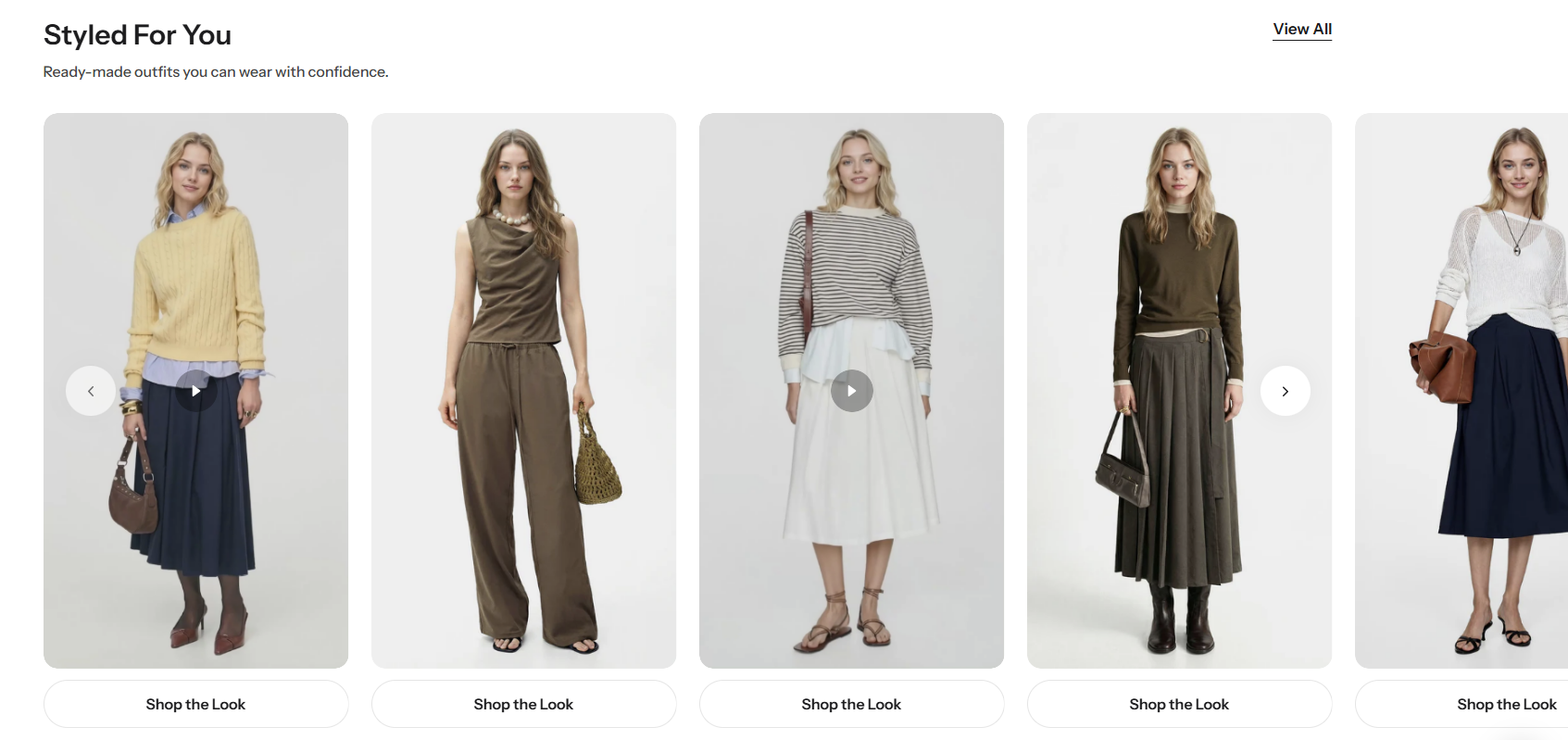
# Shop by outfit
### Section settings
#### General settings
| Setting | Description |
| ----------------- | --------------------------------------------------------------------------------------------------------------------------------------------------------------------------------------------------------------------------------------------------------------------------------------------------------------------------------------------------------------------------------------------------------------------------------------- |
| **Section width** |
3 options for container
Stretch width: span the section width regardless of screen size.
Fix width: depends on your page content width in Theme settings->Layout.
Expand full width: takes up the entire space on the page and it usually resizes itself to fit the size of the screen.
|
| **Color scheme** | Select colors from **Theme settings -> Colors** |
#### Section header
| Setting | Description |
| -------------------------------------- | -------------------------------------------------------------------------------------------------------------------------------------------------------------------------------------------------------------------------------------------------------------------------------------------------------------------------------------------------------------------------------------------------------------------- |
| **Heading** | The primary text element used to introduce or label the content within this section. |
| **Enable heading underline animation** |
Enable heading underline animation.Add an underline by wrapping text in italics. Use the Italic (I) button in the editor to apply it.
|
| **Underline style** | Select Underline style |
| **Underline color** | Customize Underline color |
| **Description** | A text element used to provide additional details or supporting information related to the heading or content of the section. |
| **Heading size** |
The size of the title:
Heading 1
Heading 2
Heading 3
|
| **Alignment** |
The position of the heading and description.
Left
Center
Right
|
| **Show view all button** | Displays a call-to-action button that links to the full collection associated with the section. |
#### Content settings
| Setting | Description |
| ---------------------------- | ------------------------------------------------------------------------------------------------------------------------------------------------------------------------------------------------------------------------------------------------------------------------------------------------------------------------------------------------------------------------------------------------------------------------------ |
| **Image ratio** |
The image ratio for the featured images of the blog posts:
Adapt to image - Uses the aspect ratio of the images. This prevents the images from being cropped.
Portrait - Crops the images to use a 3:4 ratio.
Square - Crops the images to use a 1:1 ratio
Landscape - Crops the images to use a 4:3 ratio
|
| **Video auto play** | When enabled, the video will automatically start playing as soon as the page loads, without requiring any user interaction. |
| **Items per row on desktop** | Number of columns to display on desktop computers. Minimum: 2. Maximum: 4. |
| **Column gap** |
4 options for column gap
No gap
Small
Medium
Large
|
#### Carousel settings
| Setting | Description |
| --------------------- | --------------------------------------------------- |
| **Show navigation** | Display the next and back controls for the carousel |
| **Show pagination** | Display the pagination for the carousel |
| **Reveal next slide** | Display a part of the upcoming slide. |
#### Mobile settings
| Setting | Description |
| ------------------------------ | -------------------------------------------------------------------------------------------------------------------------------------------------- |
| **Items per row on mobile** | Number of columns to display on mobile devices. |
| **Hide description on mobile** | When enabled, the description content will be hidden on mobile devices to keep the layout clean and improve the user experience on smaller screens |
#### Section padding
| Setting | Description |
| ---------- | ------------------------------------------ |
| **Top** | Customize the top margin of the section |
| **Bottom** | Customize the bottom margin of the section |
#### Section divider
Setting
Description
Show divider
Toggles the visibility of a horizontal divider line within the section.