> For the complete documentation index, see [llms.txt](https://nextsky.gitbook.io/purity-theme/llms.txt). Markdown versions of documentation pages are available by appending `.md` to page URLs; this page is available as [Markdown](https://nextsky.gitbook.io/purity-theme/group-sections/storytelling/flexible-section.md).

# Flexible section

### Section settings <a href="#section-settings" id="section-settings"></a>

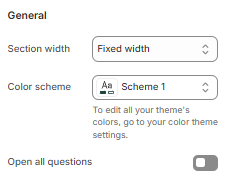
#### General settings <a href="#general-setting" id="general-setting"></a>

<figure><img src="https://1059363070-files.gitbook.io/~/files/v0/b/gitbook-x-prod.appspot.com/o/spaces%2FRcDJSoM26kdEZlVFekVW%2Fuploads%2FUte4KwKfSdDgEGf35QJy%2Fimage.png?alt=media&amp;token=fb4a1700-13e9-4ea2-911c-1803133daa2f" alt=""><figcaption></figcaption></figure>

<table><thead><tr><th width="215">Setting</th><th>Description</th></tr></thead><tbody><tr><td><strong>Section width</strong></td><td><p>3 options for container</p><ul><li><strong>Stretch width</strong>: span the section width regardless of screen size.</li><li><strong>Fixed width</strong>: depends on your page content width in <strong>Theme settings</strong> <strong>-></strong> <strong>Layout</strong>.</li><li><strong>Full width</strong>: takes up the entire space on the page and it usually resizes itself to fit the size of the screen.</li></ul></td></tr><tr><td><strong>Color scheme</strong></td><td>Select colors from <strong>Theme settings -> Colors</strong></td></tr></tbody></table>

#### Layout settings <a href="#blog-posts" id="blog-posts"></a>

<figure><img src="https://1059363070-files.gitbook.io/~/files/v0/b/gitbook-x-prod.appspot.com/o/spaces%2FRcDJSoM26kdEZlVFekVW%2Fuploads%2Fw3HsljqIVnJisxxxIlYX%2Fimage.png?alt=media&amp;token=709b2be9-12a9-4e1e-8288-97ed23d2a6b7" alt=""><figcaption></figcaption></figure>

<table><thead><tr><th width="215">Setting</th><th>Description</th></tr></thead><tbody><tr><td><strong>Direction</strong></td><td>A button used for toggling the image. <em><strong>(646px x 700px recommended)</strong></em></td></tr><tr><td><strong>Height</strong></td><td>Select your desired image to display.<br><em>* Note: Only appears when</em> <strong>Show image</strong> <em>is enabled</em></td></tr><tr><td><strong>Position</strong></td><td>Determine the position for your image on desktop.<br><em>* Note: Only appears when</em> <strong>Show image</strong><em>is enabled</em></td></tr><tr><td><strong>Alignment</strong></td><td><p>The position of the heading and description.</p><ul><li><strong>Left</strong></li><li><strong>Center</strong></li><li><strong>Right</strong></li></ul></td></tr><tr><td><strong>Gap</strong></td><td>Define the spacing between 2 blocks</td></tr></tbody></table>

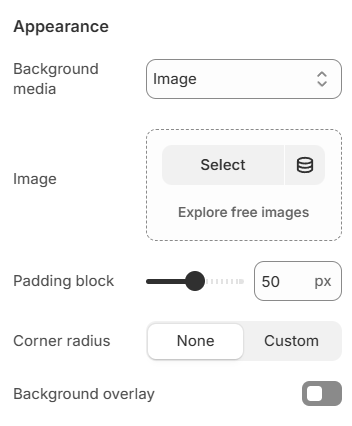
#### Appearance <a href="#settings-for-carousel" id="settings-for-carousel"></a>

<figure><img src="https://1059363070-files.gitbook.io/~/files/v0/b/gitbook-x-prod.appspot.com/o/spaces%2FRcDJSoM26kdEZlVFekVW%2Fuploads%2F9hzgAGQmD4jZOzJj1NSv%2Fimage.png?alt=media&amp;token=ce211b04-4a84-48a4-8154-c5dc54b7a69f" alt=""><figcaption></figcaption></figure>

<table><thead><tr><th width="215">Setting</th><th>Description</th></tr></thead><tbody><tr><td><strong>Background media</strong></td><td>Select a media to display as the background</td></tr><tr><td><strong>Padding block</strong></td><td>Define the top and bottom spacing</td></tr><tr><td><strong>Corner radius</strong></td><td>Define the radius of the background</td></tr><tr><td><strong>Background overlay</strong></td><td>Select a color to display as overlay background</td></tr></tbody></table>

#### Section padding <a href="#section-padding" id="section-padding"></a>

<figure><img src="https://1059363070-files.gitbook.io/~/files/v0/b/gitbook-x-prod.appspot.com/o/spaces%2FRcDJSoM26kdEZlVFekVW%2Fuploads%2Fn9cR8LZT3CAfv4J7h3u8%2Fimage.png?alt=media&amp;token=1c708185-72d4-4c92-ba1e-89e5704517bd" alt=""><figcaption></figcaption></figure>

<table><thead><tr><th width="215">Setting</th><th>Description</th></tr></thead><tbody><tr><td><strong>Top</strong></td><td>Customize the top margin of the section</td></tr><tr><td><strong>Bottom</strong></td><td>Customize the bottom margin of the section</td></tr></tbody></table>

#### Section divider

<figure><img src="https://1059363070-files.gitbook.io/~/files/v0/b/gitbook-x-prod.appspot.com/o/spaces%2FRcDJSoM26kdEZlVFekVW%2Fuploads%2FdPwtykkdgwlmnsv23zKz%2Fimage.png?alt=media&amp;token=abba5a9c-0fba-4745-8aa1-53011e45a577" alt=""><figcaption></figcaption></figure>

<table><thead><tr><th width="215">Setting</th><th>Description</th></tr></thead><tbody><tr><td><strong>Show divider</strong></td><td>Toggles the visibility of a horizontal divider line within the section.</td></tr></tbody></table>

### Block settings

<figure><img src="https://1059363070-files.gitbook.io/~/files/v0/b/gitbook-x-prod.appspot.com/o/spaces%2FRcDJSoM26kdEZlVFekVW%2Fuploads%2FNeYNaAeMceN1LlX1URRb%2Fimage.png?alt=media&amp;token=5669869a-67a2-491c-8afc-5c24d3163547" alt=""><figcaption></figcaption></figure>

<table><thead><tr><th width="215">Setting</th><th>Description</th></tr></thead><tbody><tr><td><strong>Question</strong></td><td>Defines the question text displayed at the top of each FAQ entry.</td></tr><tr><td><strong>Answer</strong></td><td>Provides the response or explanation shown when the corresponding FAQ question is expanded.</td></tr></tbody></table>