> For the complete documentation index, see [llms.txt](https://nextsky.gitbook.io/purity-theme/llms.txt). Markdown versions of documentation pages are available by appending `.md` to page URLs; this page is available as [Markdown](https://nextsky.gitbook.io/purity-theme/group-sections/storytelling/rich-text.md).

# Rich text

The **Rich text** section enables the addition of content along with auto-spin text, allowing for versatile content presentation and user interaction.

<figure><img src="https://1059363070-files.gitbook.io/~/files/v0/b/gitbook-x-prod.appspot.com/o/spaces%2FRcDJSoM26kdEZlVFekVW%2Fuploads%2F6F16HhJND4HooRvAK4rq%2Fimage.png?alt=media&amp;token=a0a52072-a4ed-4f23-b3bc-c9eda49d9c9f" alt=""><figcaption></figcaption></figure>

### Section settings

#### General settings

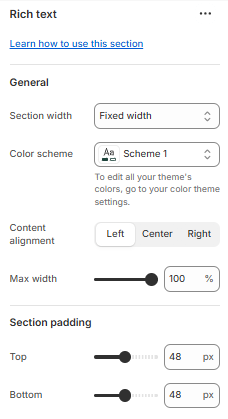
<figure><img src="https://1059363070-files.gitbook.io/~/files/v0/b/gitbook-x-prod.appspot.com/o/spaces%2FRcDJSoM26kdEZlVFekVW%2Fuploads%2FzfYAE21a0P8nOp0nXqK0%2Fimage.png?alt=media&amp;token=73d3713b-f421-4c40-9dff-ec296946e4da" alt=""><figcaption></figcaption></figure>

<table data-full-width="false"><thead><tr><th width="215.199951171875">Setting</th><th>Description</th></tr></thead><tbody><tr><td><strong>Section width</strong></td><td><p>3 options for container</p><ul><li><strong>Stretch width</strong>: span the section width regardless of screen size.</li><li><strong>Fixed width</strong>: depends on your page content width in <strong>Theme settings</strong> <strong>-></strong> <strong>Layout</strong>.</li><li><strong>Full width</strong>: takes up the entire space on the page and it usually resizes itself to fit the size of the screen.</li></ul></td></tr><tr><td><strong>Color scheme</strong></td><td>Select colors from <strong>Theme settings -> Colors</strong></td></tr><tr><td><strong>Content alignment</strong></td><td><p>The position of the block</p><ul><li><strong>Left</strong></li><li><strong>Center</strong></li><li><strong>Right</strong></li></ul></td></tr><tr><td><strong>Max width</strong></td><td>Set the largest width the section/content can reach on wide screens.</td></tr></tbody></table>

#### Section padding <a href="#section-padding" id="section-padding"></a>

<table><thead><tr><th width="215">Setting</th><th>Description</th></tr></thead><tbody><tr><td><strong>Top</strong></td><td>Customize the top margin of the section</td></tr><tr><td><strong>Bottom</strong></td><td>Customize the bottom margin of the section</td></tr></tbody></table>

### Block settings <a href="#heading-subheading-description" id="heading-subheading-description"></a>

#### Heading, Subheading, Description <a href="#heading-subheading-description" id="heading-subheading-description"></a>

<figure><img src="https://1059363070-files.gitbook.io/~/files/v0/b/gitbook-x-prod.appspot.com/o/spaces%2FRcDJSoM26kdEZlVFekVW%2Fuploads%2FXXNj6rdAySDftqaOyGwk%2Fimage.png?alt=media&amp;token=ef58044c-6f15-4e0b-aeae-8df113e8c19f" alt=""><figcaption></figcaption></figure>

<table><thead><tr><th width="215">Setting</th><th>Description</th></tr></thead><tbody><tr><td><strong>Heading, Subheading, Description</strong></td><td>Custom title block</td></tr><tr><td><strong>Width</strong></td><td><p>The width of text block:</p><ul><li><strong>Fit</strong>: adapts to the text length.</li><li><strong>Fill</strong>: stretches across the container width.</li></ul></td></tr><tr><td><strong>Typography - Preset</strong></td><td>Choose a preset style (font, size, weight) from <strong>Theme settings → Typography</strong>.</td></tr><tr><td><strong>Background</strong></td><td>Toggle ON to enable a background area behind the text.</td></tr><tr><td><strong>Background color</strong></td><td>Select the color for the text background.<br><em>* Note: Only appears when <strong>Background</strong> is enabled</em></td></tr><tr><td><strong>Corner radius</strong></td><td>Adjust the roundness of the background corners<br><em>* Note: Only appears when <strong>Background</strong> is enabled</em></td></tr><tr><td><strong>Padding top/bottom</strong></td><td>Adjust these values to control the amount of space between the section’s content and its outer edges.</td></tr></tbody></table>

#### Button <a href="#button" id="button"></a>

<figure><img src="https://1059363070-files.gitbook.io/~/files/v0/b/gitbook-x-prod.appspot.com/o/spaces%2FRcDJSoM26kdEZlVFekVW%2Fuploads%2FnqdLn6o0jzUZjxo0xAOy%2Fimage.png?alt=media&amp;token=200a5d86-9e6d-44e5-a065-e531a0f8060a" alt=""><figcaption></figcaption></figure>

<table><thead><tr><th width="215">Settings</th><th>Description</th></tr></thead><tbody><tr><td><strong>Button label</strong></td><td>Customize button name, or leave it empty to hide the button</td></tr><tr><td><strong>Button link</strong></td><td>The link URL you want to add</td></tr><tr><td><strong>Type</strong></td><td><p>The style of the button</p><ul><li><strong>Primary</strong></li><li><strong>Outline</strong></li><li><strong>Link</strong></li></ul></td></tr><tr><td><strong>Open link in new tab</strong></td><td>Open the link in a new browser tab</td></tr><tr><td><strong>Spacing bottom</strong></td><td>Spacing between the button and the next component</td></tr></tbody></table>
